Numéro d'article
513156

Brodit support fixé install. Symbol MC9500

PVC 111,95 €
  • Livraison rapide
  • Produits de haute qualité
  • Paiements sécurisé
Détails
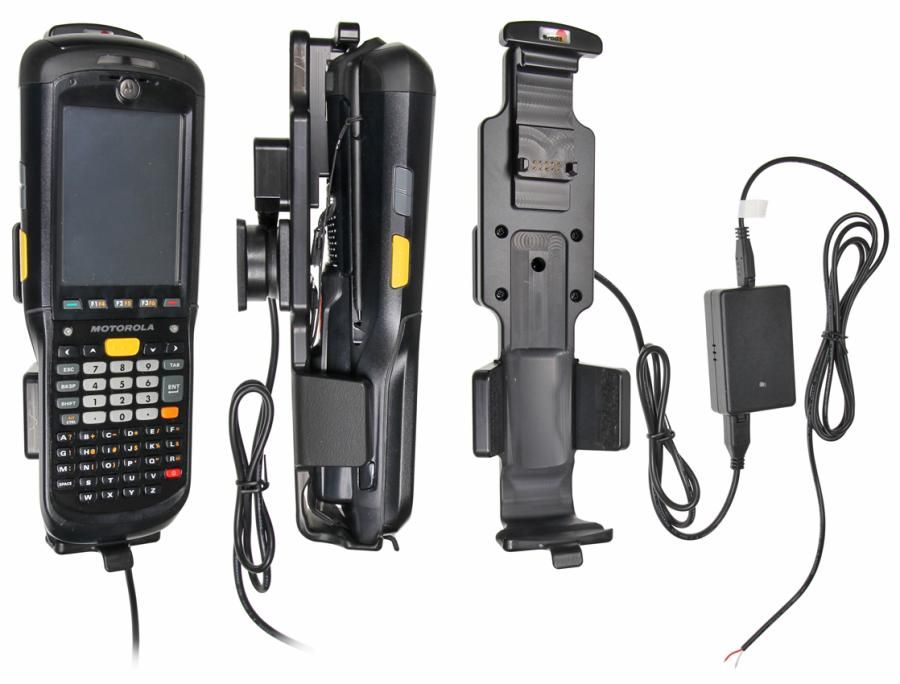
Ce support-chargeur de Brodit est équipé d'une connexion fixe pour charger votre appareil. Dès que vous insérez l'appareil dans le support, le chargement commence. Au dos du support, il y a un mécanisme de rotation qui permet de régler le support à n'importe quel angle pour éviter les réflexions gênantes. L'installation est rapide et facile. Il est livré avec des instructions d'installation détaillées et est fabriqué en plastique ABS noir.
Plus d'infos
Plus d'infos
Marque d'accessoire Brodit
Barcode 7320285131569
Prix Public TTC 111,95 €
Appareil avec ou sans étui Sans étui
Caractéristique du support Spécifique à l'appareil
Cable / Qi / charger type / connnector Molex, installation fixe
Charger l'appareil via Broches pogo
Tension d'entrée 12V et 24V compatible
Voltage (output) 4.75 - 5.25V
Max Amperage 2,0 Amp
Montage standaard AMPS
Verrouillable non
Couleur noir
Info produit Support professionnel avec rotule pour votre smartphone, système de navigation ou tablet. Plus de réflexions ennuyeuses par la possibilité de modifier l’inclinaison.
Installation produit Montez le support sur un ProClip dans votre véhicule. Le produit est livré avec un manuel détaillé.
Compatibilité produit Vérifiez dans “liste de compatibilité si votre smartphone, système de navigation ou tablet est compatible avec ce support
Voir plus + Montrer moins -
Compatibility
Voir plus + Montrer moins -
Instruction
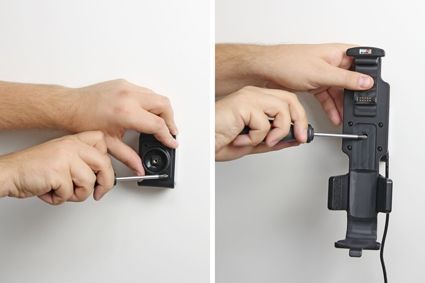
Please read all of the instructions and look at the pictures before attaching the holder. Important Note: The charger unit is fused internally with 2 A automotive re-settable thermal fuse, but if an external fuse is to be installed then connect a 2 A fuse holder and fuse inline with the Red wire close to the power source. Route the cable from the holder into the vehicle dashboard and secure the charger unit in place with the adhesive tape provided. Ensure the charger unit is securely mounted behind the dashboard in a well ventilated area that does not get hot! Note: If you are connecting a GPS/Data device to the holder please ensure the charger unit is located in a position within easy reach of any GPS or charging adapters. Route the power cable from the charger unit to the power supply source in the vehicle and connect as follows: 1. Connect the White wire to a Negative Ground connection of the vehicle or the vehicle chassis. 2. Connect the Red wire to a 12/24 Volt power supply in the vehicle that is controlled by the ignition switch of the vehicle. Installation of the holder:1. Loosen the screw in the center of the holder so you can remove the tilt swivel attaching plate on the back.
2. Place the attaching plate onto the desired position. Screw the attaching plate into place. Place the holder over the attaching plate so the screw fits in the hole in the tilt swivel. Tighten the screw so the holder is firmly in place, but still can be adjusted.
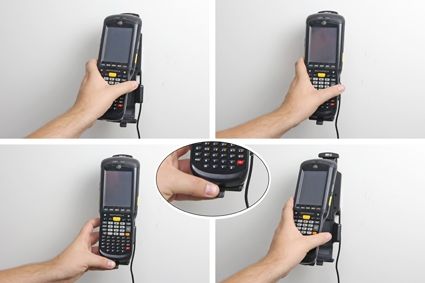
3. To place the device in the holder: Place the upper part of the device in the holder, then flip/press the lower part forwards so it snaps into place in the holder. To remove the device from the holder: Press upwards on the upper part of the holder, in the same time pull the upper part of the device out from the holder and then lift the device up and out from the holder.
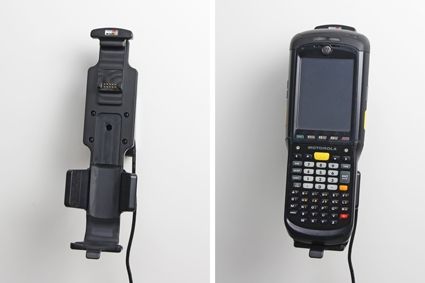
4. The holder is in place.
Scroll to top